🏆 Course Overview
In today’s digital era, having your own website is no longer optional — it’s essential.
This Free WordPress Website Building Course will take you step-by-step from zero to launch.
Whether you want to build a business website, blog, eCommerce store, or portfolio, this course will help you create a professional, mobile-friendly site without any coding experience.
💡 Why Choose WordPress?
WordPress powers more than 43% of all websites on the internet — from personal blogs to Fortune 500 company sites.
It’s an open-source platform trusted by millions of businesses, developers, and digital marketers around the world.
With its flexible design, powerful plugins, and easy content management system (CMS), WordPress allows anyone to build beautiful, high-performing websites with complete control and ownership.
🌍 Applications and Advantages
WordPress can be used for nearly any type of website — business sites, online stores, blogs, portfolios, educational platforms, and even membership or booking systems.
Its major advantages include:
🧩 Extensibility: Thousands of free and premium plugins to expand functionality
🎨 Design Freedom: Thousands of responsive themes for every niche
⚡ SEO-Friendly: Built-in structure optimized for Google ranking
🔒 Secure and Scalable: Constantly updated and supported by a huge global community
🌐 Multilingual Support: Ideal for international businesses and content creators
Whether you’re a startup owner, freelancer, or content creator, WordPress gives you the freedom to grow your online presence — your way.
🎯 Course Objectives
By the end of this course, you will be able to:
- ✅ Install and set up WordPress on your hosting platform
- ✅ Choose and customize professional themes and templates
- ✅ Build responsive pages using Elementor or Gutenberg
- ✅ Add essential plugins for SEO, speed, and security
- ✅ Connect your domain, SSL certificate, and contact forms
- ✅ Launch and manage your own WordPress website confidently
👩💻 Who This Course Is For
This course is perfect for:
- 🌱 Beginners who want to start their first website
- 💼 Entrepreneurs or freelancers building personal or business sites
- 🛒 Small business owners planning to sell online
- 🎓 Students and content creators who want to share their ideas or portfolio
⚙️ Basic Requirements
To get the most out of this course, you’ll need:
- 💻 A computer with internet access
- 🌍 A domain name and hosting account (we’ll guide you to free or low-cost options)
- 🧠 A willingness to learn and experiment
❓How do I begin taking the course?
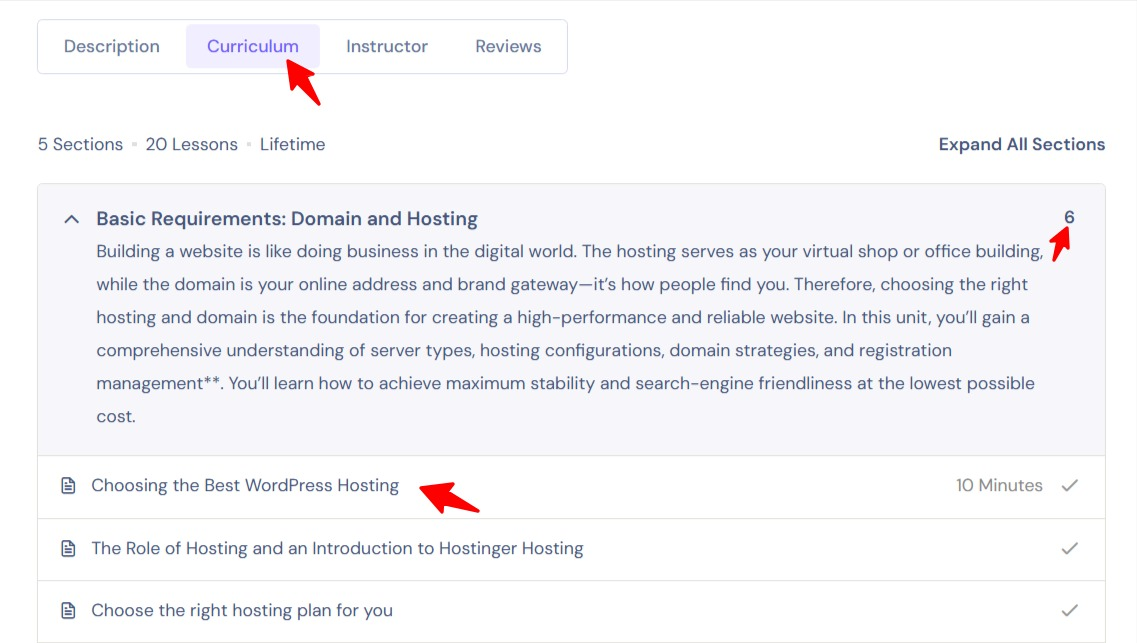
Many people are confused about the learning portal for this course website. Please refer to the image below: return to the top of each course, click the second tab after the course description labeled “Curriculum,” then click the course unit to expand the lessons, and click a lesson to begin learning.
🚀 Ready to Start?
Join thousands of learners who’ve already built their own websites with WordPress.
👉 Enroll now and start creating your digital presence today!
👇Now begin your first lesson:
Author Profile

- Freely.work Founder,15 years as a freelancer/digital nomad.Marketing consultant for Fortune Global 500 companies, digital marketing expert.
Latest entries
 WordPress courseNovember 5, 2025WordPress Operations
 Digital MarketingNovember 2, 2025AIO / GEO Optimization
 WordPress courseOctober 28, 2025WordPress Building Course
 SEOJune 2, 2025SEO Optimization Course
Curriculum
- 5 Sections
- 21 Lessons
- Lifetime
- Basic Requirements: Domain and HostingBuilding a website is like doing business in the digital world. The hosting serves as your virtual shop or office building, while the domain is your online address and brand gateway—it’s how people find you. Therefore, choosing the right hosting and domain is the foundation for creating a high-performance and reliable website. In this unit, you’ll gain a comprehensive understanding of server types, hosting configurations, domain strategies, and registration management**. You’ll learn how to achieve maximum stability and search-engine friendliness at the lowest possible cost.6
- Apply for and activate your corporate email accountCorporate email accounts use the company's official website domain as their suffix, maintaining consistency with the corporate brand to build a stronger brand image and enhance user trust.2
- Install the wordpress website coreOnce the hosting is purchased, it's equivalent to securing a rental property. The next step involves basic functional planning, namely installing the core website program.2
- Website Functionality Expansion - WordPress Plugin CourseWordPress consists of three main components: the core framework (the bare-bones structure), plugins (functional extensions), and themes (visual styling and layout).5
- 4.1WordPress Plugin Installation Guide: The Power Behind Every Website
- 4.2WordPress Installation Demo 1: Email Sending Plugin (Fluent SMTP)
- 4.3Plugin Installation Demo 2: Fluent Form Plugin
- 4.4WordPress Plugin Installation Demo 3: Backup Plugin (UpdraftPlus)
- 4.5How to Deactivate and Delete WordPress Plugins
- WordPress Theme Template Basics TutorialWordPress themes are like interior design plans for a house—they determine the layout, style, and aesthetic, ultimately shaping the visual impression and experience your website delivers to visitors.Designing or selecting a theme that aligns with your product and brand identity is crucial, as it conveys your aesthetic.is one of the key factors in winning over customers.6