

WordPress Plugin Installation Guide: The Power Behind Every Website
🧩 WordPress Plugins Explained: The Power Behind Every Website
1. What Is a WordPress Plugin?
Think of your WordPress website as a house.
- The domain is your address.
- The hosting is the land your house stands on.
- The WordPress core is the structure — walls, doors, and rooms.
- The theme is the interior design — the colors, furniture, and layout.
- And the plugins? They’re your home appliances and smart devices — the washing machine, the security camera, the air conditioner……
Each plugin adds new functionality or enhances existing features without requiring you to code.
Another way to understand it:
Your smartphone is like WordPress, and the plugins are apps. You install apps to extend what your phone can do — play music, track fitness, or send emails. Similarly, plugins extend what your website can do.
2. Why Plugins Matter
Plugins make WordPress flexible, powerful, and customizable.
There are over 60,000 free plugins in the official WordPress Plugin Directory — plus thousands of premium (paid) ones that offer advanced features and professional support.
With plugins, you can:
- Add contact forms, live chat, and popups
- Optimize SEO and performance
- Create online stores (like WooCommerce)
- Back up your site automatically
- Connect with social media or email services
Simply put — plugins are the reason WordPress can do almost anything.
3. Two Ways to Install Plugins
There are two main ways to install plugins in WordPress:
🧭 Method 1: Install from the WordPress Dashboard
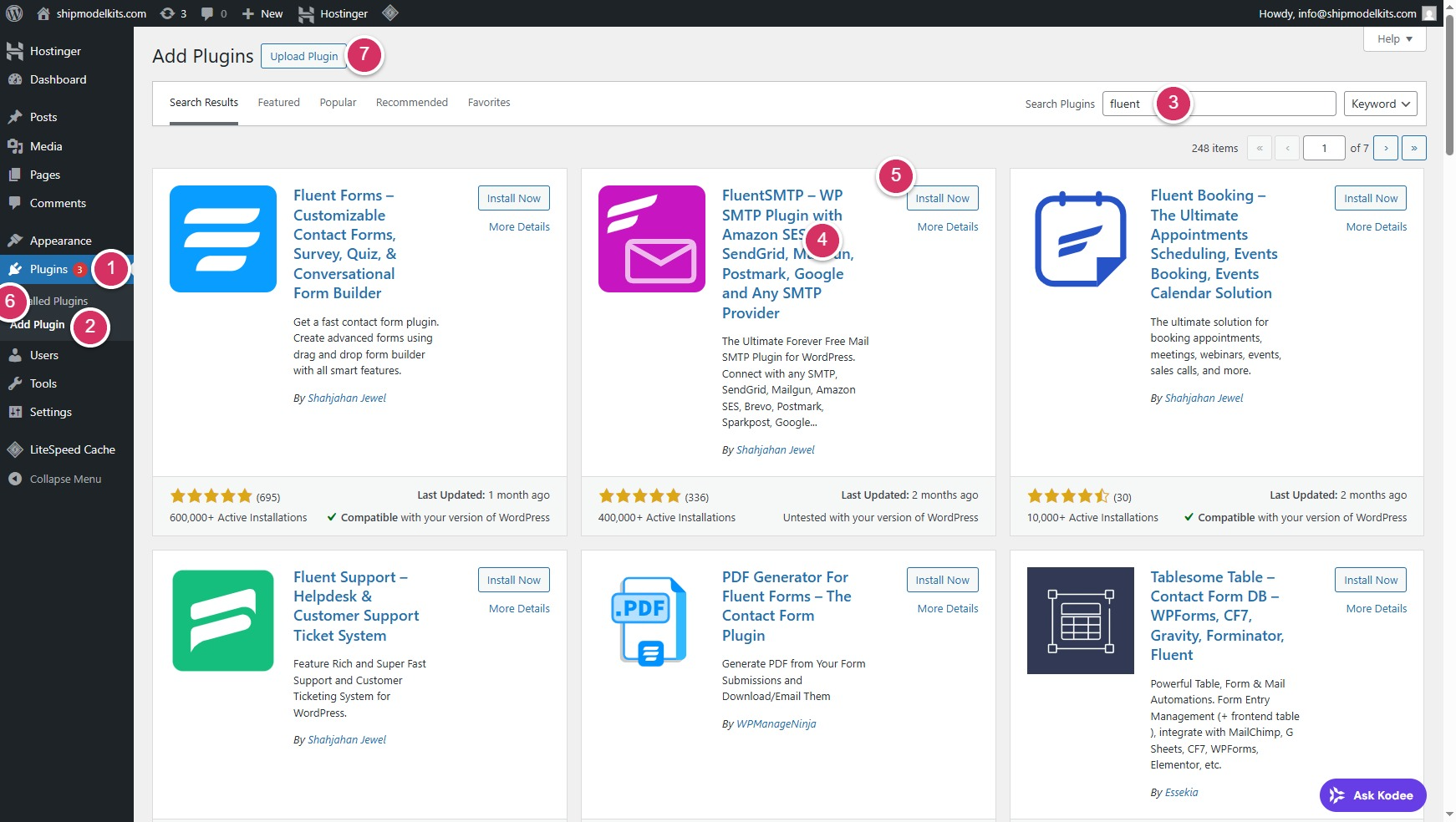
- Log in to your WordPress Admin Panel.Go to Plugins →
- Add Plugin.
- Search for the plugin name (e.g., Fluent SMTP).
- You can click the plugin title or “More Details” to view its features and installation instructions. If you’re not comfortable with English, right-click to translate it into your native language (a feature available in Microsoft Edge).
- Click Install Now, then Activate.
✅ Best for free plugins from the official WordPress repository.
📦 Method 2: Upload a Plugin (For Premium or Custom Plugins)
Purchase or download the plugin ZIP file (from the developer’s website or a trusted marketplace).
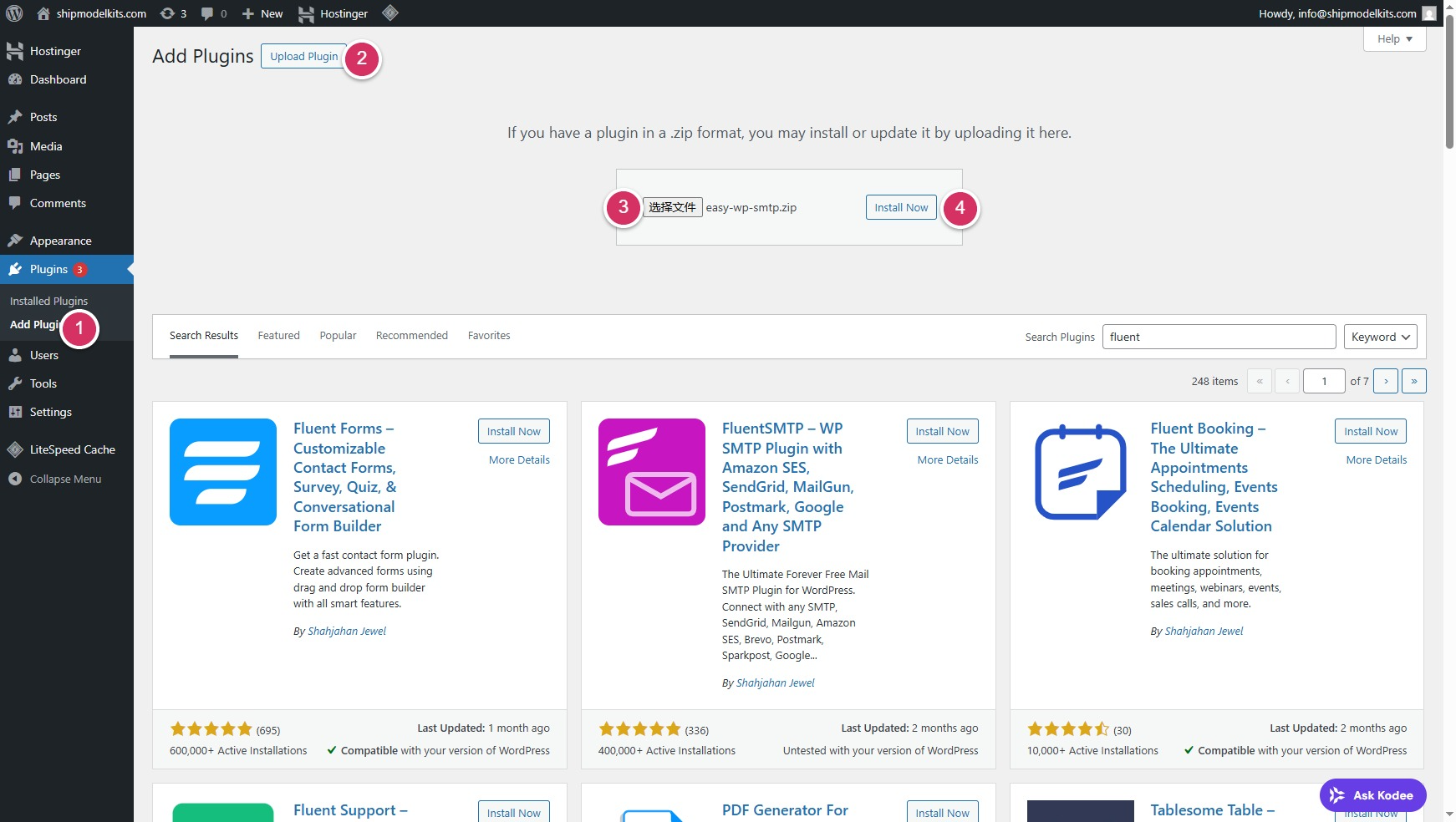
- Go to Plugins → Add New →
- Upload Plugin.
- Click Choose File, select the ZIP file
- Click Install Now.
- After uploading, click Activate Plugin.
✅ Best for paid plugins or custom-developed ones.
4. Summary
| Concept | Example | Purpose |
|---|---|---|
| Plugin | Like an app or home appliance | Adds or improves features |
| Install from Dashboard | Free plugins | Quick and easy |
| Upload ZIP File | Premium plugins | Manual installation |
💡 Pro Tip:
Only install necessary and trusted plugins to keep your website fast and secure.
Update plugins regularly and remove any you no longer use.
🧠 How to Choose the Right Plugins
When selecting a WordPress plugin, don’t just install the first one you find. Take a moment to check these key points:
- 🧩 Compatibility: Make sure the plugin is compatible with your current WordPress core version and PHP version to avoid errors or conflicts.
- 🕓 Last Updated: Choose plugins that have been updated recently (within the last 6–12 months). Regular updates mean the developer is maintaining and improving it.
- ⭐ Ratings & Reviews: Look at user feedback and star ratings. A plugin with thousands of active users and 4+ stars is usually trustworthy.
- 📈 Active Installations: Popular plugins are more likely to be stable and secure.
- 🛠️ Support & Documentation: Check if the developer provides setup guides, tutorials, and active support — especially for premium plugins.
💡 Fewer, well-maintained plugins are better than many outdated ones. Always keep your plugins updated and remove those you no longer need.
✅ Key Takeaway
“Themes make your site look good, but plugins make it powerful.”
With just a few plugins, your WordPress site can become an online store, a learning platform, a business hub — or anything you can imagine.
In the next class, we will demonstrate installing two essential plugins.
Author Profile

- Freely.work Founder,15 years as a freelancer/digital nomad.Marketing consultant for Fortune Global 500 companies, digital marketing expert.
Latest entries
 December 17, 2025Mastering Google Search Console (GSC)
 December 16, 2025Yoast SEO Plugin: Overview, Benefits, and Installation Guide
 December 16, 2025What Is an SEO Plugin?
 December 2, 2025Adding Variable Products with Multiple Configurations